The AI home inventory app that films the paperwork for you
Record a quick video and let AI build your inventory. Capture each item's condition with photos, and export a PDF or Excel report whenever you need one. Home, office, or warehouse — all in one place.
Free to start
For homeowners, renters, businesses, and warehouses — anyone who keeps an inventory.
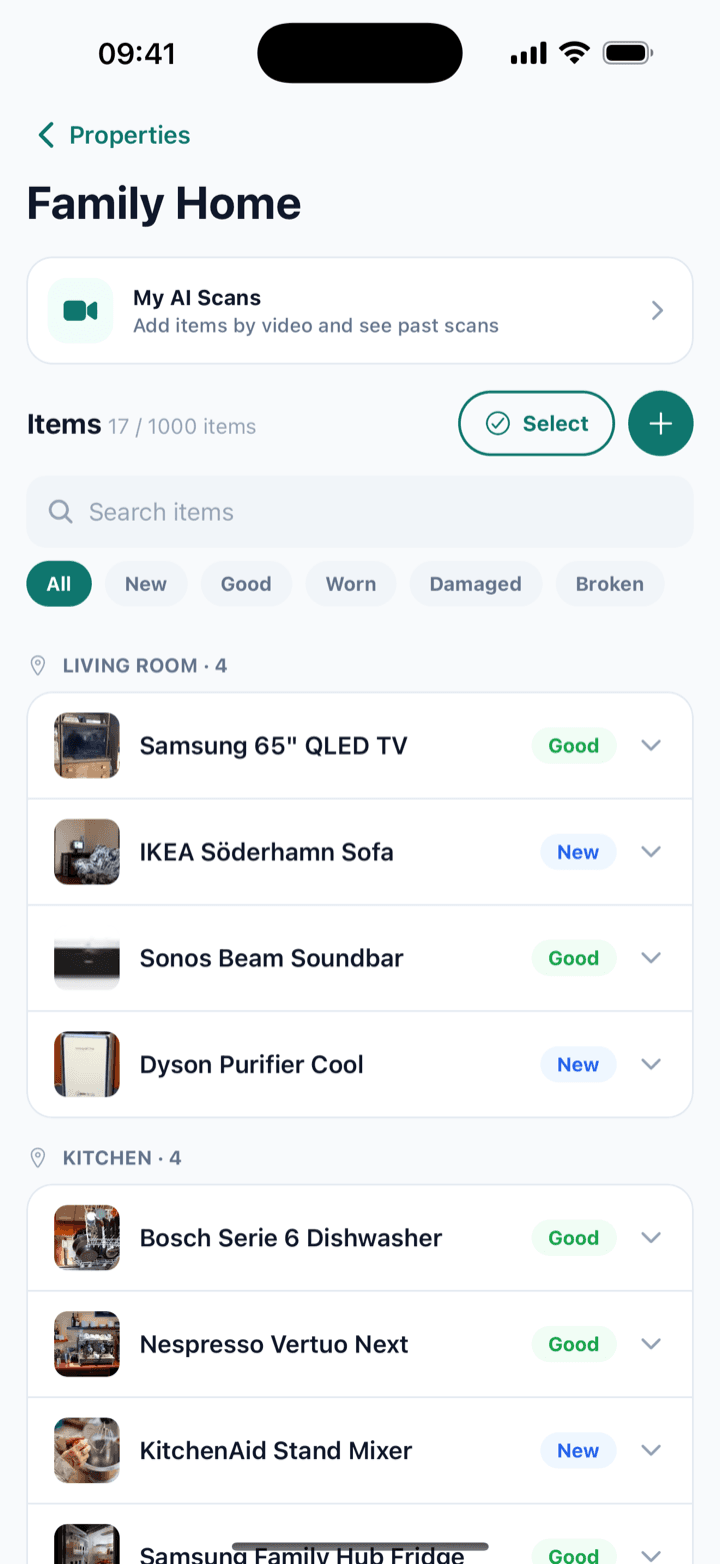
From messy rooms to a clean, shareable record
Homover turns the tedious job of listing and proving the condition of your things into a few taps.
AI video scan
Walk through a room on camera. Homover's AI detects your items and drafts the inventory for you — no manual typing.
Condition documentation
Attach photos and mark each item as new, good, worn, damaged, or broken. Proof you can rely on later.
PDF & Excel reports
Export a clean, professional report — ideal for handovers, insurance claims, and moving day.
Properties & zones
Organize by property and zone. Manage a home, office, warehouse, or a whole portfolio from one place.
Property documents
Insurance, the deed, a purchase or rental contract — keep any document that matters for your property on record, together with its inventory.
Private & secure
Your data is stored securely on our servers and available whenever you need it. Encrypted in transit, scoped to your account.
Three steps to a complete record
Record a walkthrough
Open the app and film a short video of the room or space you want to document.
AI builds your inventory
Homover detects items and drafts a list. Review, tweak, and add condition and photos.
Export your report
Generate a PDF or Excel report and share it with anyone — your record is ready.
Let the camera do the paperwork
Filming a room is faster than writing a list. Homover's AI watches your walkthrough, recognizes furniture and belongings, and turns them into a structured inventory you can refine in seconds.
- Auto-detects items from a single video
- Suggests names and quantities
- You stay in control — edit anything before saving
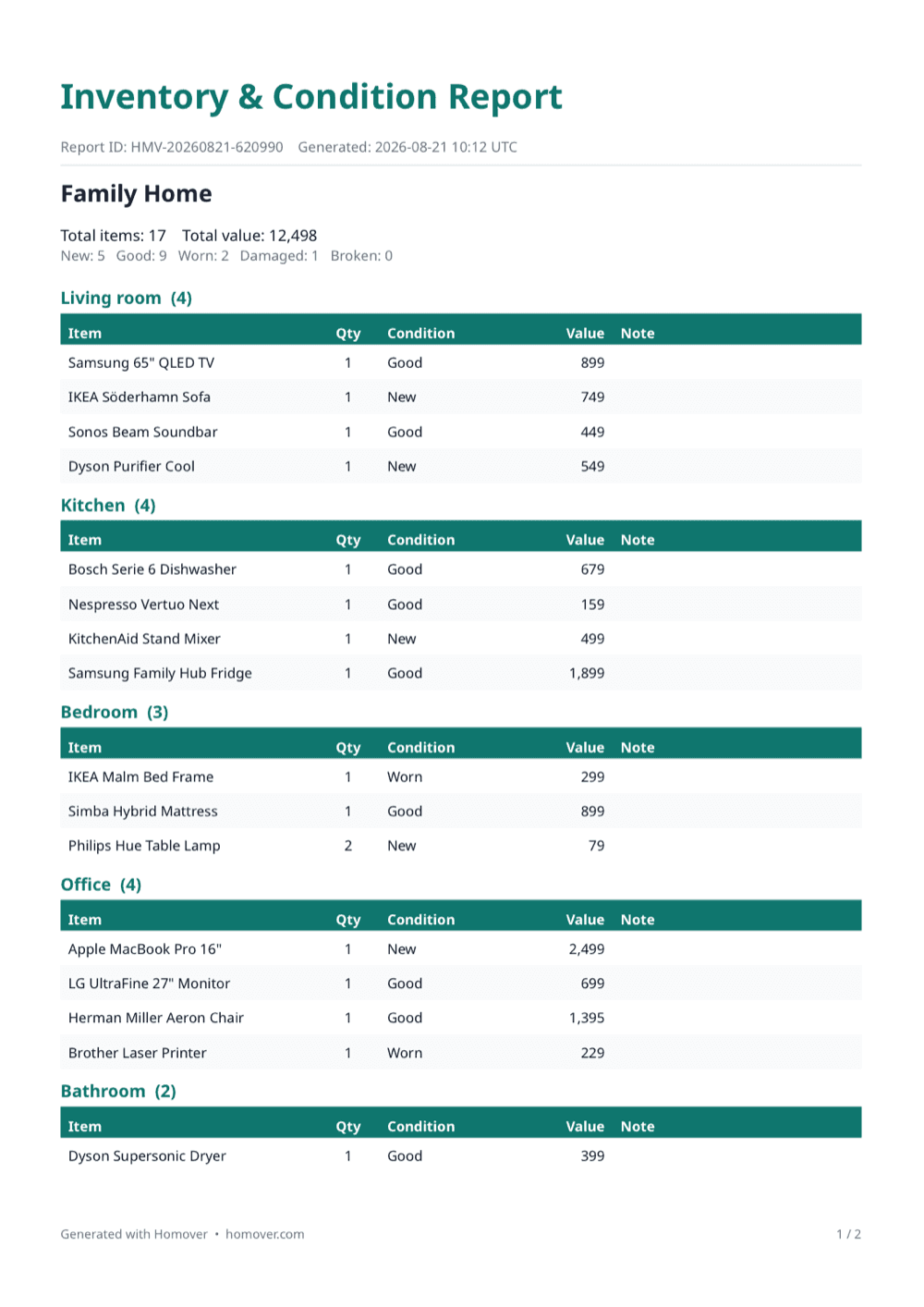
Turn your inventory into a report.
Organized by room, with each item’s condition, value, and photos. Download it as PDF or Excel anytime.
- Inventory grouped by room
- Each item's condition, quantity, and value
- Total items and total value summary
- One tap to PDF or Excel
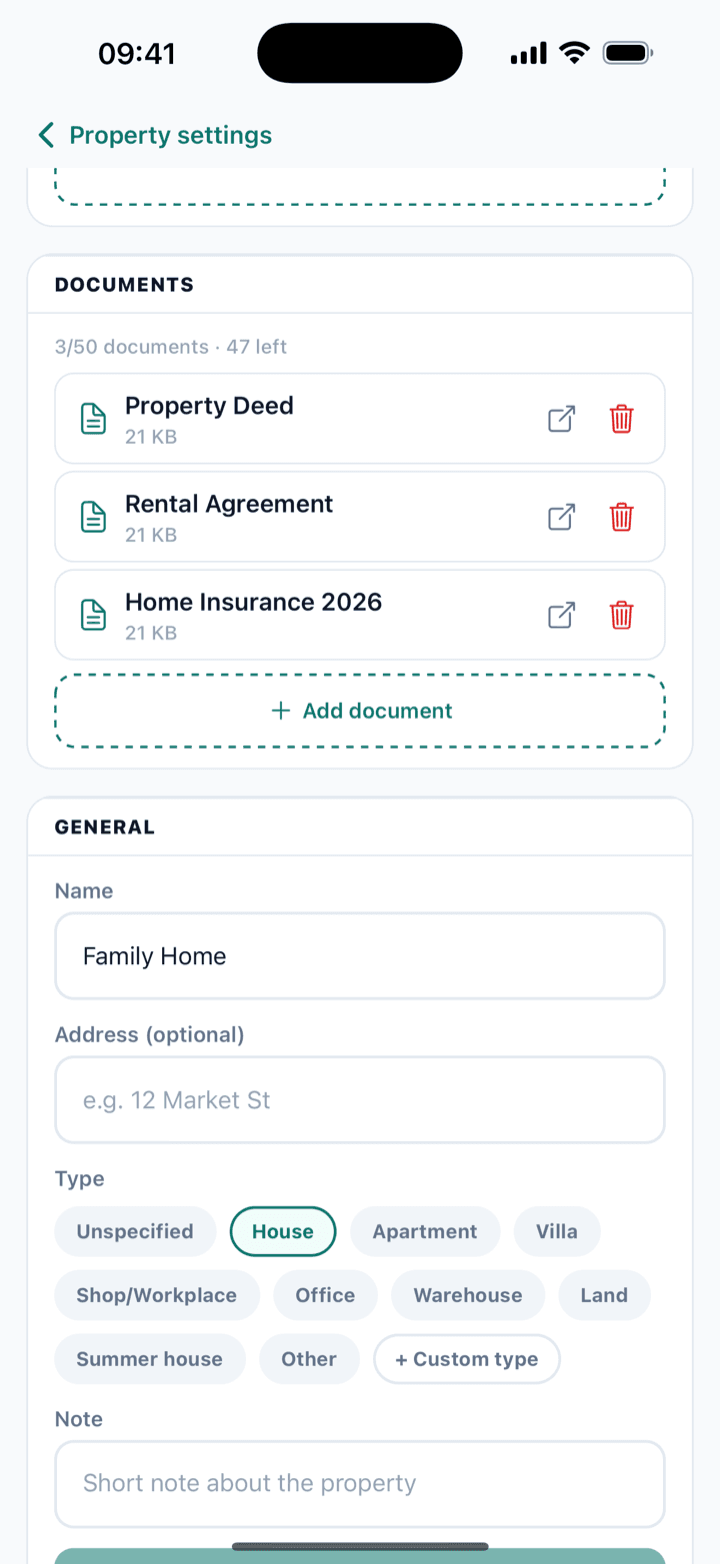
Your property's documents too.
Insurance, the deed, a rental or purchase contract — keep your property’s key paperwork in the same place as its inventory, and reach it anytime.
- Insurance policies
- Deed and purchase documents
- Rental agreements
- Stored securely, reachable from any device
Start free. Upgrade when you need more.
Free
Free
- 1 property
- 50 items per property
- 2 AI video analyses / year
- 50 photos
- 3 property documents
- Unlimited reports
Premium
$30/year
- 5 properties
- 1000 items per property
- 50 AI video analyses / year
- 5000 photos
- 50 property documents
- Unlimited reports
Questions, answered
What does Homover do?
Homover lets you keep an AI-powered inventory of the belongings in your property. Film a short video of a room and the AI recognizes your items and lists them; you record each one’s condition and value and add photos. Export a PDF or Excel report anytime. It’s for homeowners, renters, businesses, or warehouses — anyone who wants their inventory on record.
How does the AI video scan work?
You film a quick walkthrough of a room. Homover’s AI recognizes the furniture and items in the video and suggests names and quantities. You stay in control: review the list, edit it, and add or remove items before saving. No typing everything by hand.
What’s in the report?
Inventory grouped by room; each item’s quantity, condition (new, good, worn, damaged, broken), and value; a summary of total items and total value; and the photos you added. Download it as PDF or Excel and share it with anyone.
Can I also store my property documents?
Yes. Keep the documents that matter for your property — an insurance policy, the deed, a purchase or rental contract — in the same place as its inventory. Your belongings and your property’s paperwork, all in one place.
Do I need to pay to start?
No. Reports are free, unlimited, and watermark-free on every plan. Premium only comes in when you want more properties, items, photos, and AI scans.
How many properties and items can I add?
The Free plan includes 1 property with 50 items per property. Premium gives you up to 5 properties, 1000 items per property, and 5000 photos.
Is my data safe?
Yes. Your data is scoped to your account, encrypted in transit, and stored securely on our servers, so you can reach it from any device.
Can I export or delete my data?
Yes. You can export your inventory as a PDF or Excel report anytime, and you can permanently delete your account and all its data from inside the app. The choice is always yours.
Which platforms are supported?
Homover is available on iPhone today. Android and web versions are on the way.
Ready to document what matters?
Download Homover and turn your first room into a report in minutes.